

How much does it cost to build a website?

Thinking about building a website? Whether you are a small business owner, a freelancer, or launching a side project, one of the first questions you will want answered is: how much does it cost to build a website? Understanding your website costs early on can help you budget effectively and avoid unpleasant surprises.
Key takeaways
- Website costs vary greatly based on functionality, design, and content needs.
- Key cost areas include design, development, domain/hosting, content, and SEO optimizations.
- Upfront costs can include domain registration, design, development, and initial content, while ongoing costs involve hosting, maintenance, and content updates.
- E-commerce sites typically incur higher costs than regular websites due to added features and security measures.
- Investing in good content and SEO is crucial for achieving better returns and improving site visibility.
What are you paying for when building a website?
The truth is that the answer is rarely simple. Ask ten business owners about their website building costs, and you will probably get ten completely different answers. That is because website costs can range from almost nothing to tens of thousands of dollars. The variation comes down to what you need your website to do. A small brochure site with a few pages can be built on a modest budget, whereas an ecommerce store with thousands of products and secure payment facilities will always cost more.
The good news is that once you understand where the costs lie, you can make better decisions. While Yoast SEO will not directly reduce your build costs, it will help you avoid expensive SEO mistakes, improve site performance, and keep your long-term marketing budget under control.
So, what are the costs of building a website?
Design and user experience: This sets the tone for how visitors feel about your site. Good design is not only about colors and fonts, but also about navigation, site structure, and encouraging visitors to stay and explore.
Development: Turns your designs into a working website. A simple build will cost less, but advanced features or integrations push the price up.
Domain and hosting: These two are essential and unavoidable. Your domain name generally costs between $10 and $100 per year, and hosting keeps your site live. Shared hosting is the cheapest, but dedicated hosting provides better performance and enhanced security. Hosting can cost anywhere from $5 to $100+ per month. As a recommendation, Bluehost is a great choice for both domain registration and hosting. On top of that, it also works extremely well with WordPress.
Content: A blank page isn’t going to keep visitors on your site for very long, so you’re going to need to have something to show them. You can, of course, create your own content, but professional content creators can be useful for driving more conversions.
SEO: This ensures your site gets found. You can do it yourself, but Yoast SEO simplifies the process and can reduce costs by guiding you in optimizing pages as you write.
Here’s a chart to explain the above in a quick-check guide:
| Area | Description |
| Design | Custom visuals, layout, user interface (UI), mobile responsiveness |
| User experience (UX) | Navigation logic, site structure, call-to-action placement |
| Development | Code, content management system (CMS), plug-ins or features |
| Domain and hosting | Your website’s address and where it lives online |
| Content and SEO | Written pages, blog posts, metadata, and optimizations |
| Ongoing maintenance | Plugin updates, security, backups, fixes |
Upfront costs
Of course, none of this comes for free, unless there are some things you can do yourself, like copywriting or photography. This will still cost you time, though, so it may be worth considering hiring a professional if there are other areas of your business you would rather focus on. With that in mind, let’s take a quick look at some upfront costs that you will only have to pay for once at the very start.
| Type of cost | Low estimate | High estimate |
|---|---|---|
| Domain name | $12/year | $120/year |
| Design & UX | $0 (DIY template) | $12,000+ |
| Development (CMS setup, features, integrations) | $0 (DIY) | $45,000+ |
| Initial content (copywriting, images, product setup) | $200 | $6,000+ |
Ongoing and variable costs
Obviously, once your website is up and running, that’s not the end of the story. You are presumably here for the long term, which means there will be recurring costs. These include hosting so your site can stay live, maintenance to keep everything secure and up to date, and posting new content to continually engage your site’s visitors.
Ongoing costs (billed monthly or yearly)
| Type of cost | Low estimate | High estimate |
|---|---|---|
| Traditional hosting | $5/month | $120+/month |
| DIY website builder | $10/month | $500+/month |
| Maintenance & security (updates, backups, SSL, fixes) | $120/month | $600+/month |
| Ongoing content & SEO | $250/year | $6,000+/year |
Variable costs
Most people focus on the look and feel of their site, and while that is important, it’s not the only thing to consider. Understandably, things like legal technicalities and CDNs aren’t front of mind when you’re excited about growing your business, but they’re necessary. That means you’ll need to complete these often-overlooked tasks to ensure you stay on track for growth and remain compliant.
| Type of cost | Low estimate | High estimate |
|---|---|---|
| Marketing & ads | $110/month | $11,000+/month |
| Accessibility & legal compliance | $220 | $5,500+ |
| Scaling & performance upgrades (plugins, CDN, extra development work) | $110 | $5,500+ |
Website building options
The method you choose to build your website will shape its cost, flexibility, and long-term potential. Here are four common approaches, each with its own trade-offs.
DIY website builders (Wix, Squarespace, etc.)
These platforms let you create a site without coding or design skills. They’re simple, affordable, and work well for portfolios, hobby sites, or small businesses just starting, basically anyone who wants a site quickly.
Pros:
- No technical skills required.
- Fast setup, as you can launch your site in a day.
- Low upfront cost, with plans starting around $10–$20/month.
Cons:
- Limited customization, so you’re stuck with the platform’s templates and features.
- Harder to scale as your business grows.
- SEO options are basic, which can make it tougher to rank in search results.
WordPress + Yoast SEO
WordPress is a flexible, scalable platform used by millions of businesses. When paired with Yoast SEO, it helps you optimize content from the start, making it easier to grow your site’s visibility over time. WordPress is a great option for small to medium-sized businesses, bloggers, and online stores that want room to grow.
Pros:
- Full control over design and functionality.
- Thousands of plugins, like WooCommerce for online stores, to add features as needed.
- Strong SEO capabilities with Yoast SEO.
- More cost-effective in the long run, as you won’t need to rebuild as your business grows.
Cons:
- Steeper learning curve than DIY builders.
- Requires some maintenance, with updates, backups, and security.
- Hosting and domain costs add up, although they’re still affordable.
Custom-built website by an agency or developer
For businesses with complex needs, like advanced e-commerce, unique functionality, or strict security requirements, a custom-built site offers the most control. You’ll work with a developer or agency to create a site tailored to your exact specifications.
Pros:
- No compromises, so you get exactly what you want.
- Scalable and secure, built to handle specific needs.
- Professional support for maintenance and updates.
Cons:
- High upfront cost, typically $5,000–$20,000+.
- Longer development time, which could take weeks or months.
- Ongoing costs for hosting, maintenance, and updates.
AI-powered website builders (Bluehost, Framer, Wix AI, etc.)
AI website builders are a newer option that lets you create a site by describing what you need. The AI generates a design, writes content, and even suggests layouts based on your input. Some platforms, like Bluehost’s AI builder, let you refine the site through conversation. These AI site builders work well for small businesses, freelancers, or anyone who wants a professional site quickly without technical hassle.
Pros:
- No design or coding skills required, because you just describe your needs.
- Fast setup, can be ready in under an hour.
- Built-in hosting and domain, without extra setup.
- Some AI builders, like Bluehost, allow ongoing edits via chat.
Cons:
- Limited customization compared to WordPress or custom-built sites.
- May not scale well for complex businesses.
- SEO options vary, and some AI builders are better than others.
Using AI to build websites: How Bluehost’s AI Website Builder works
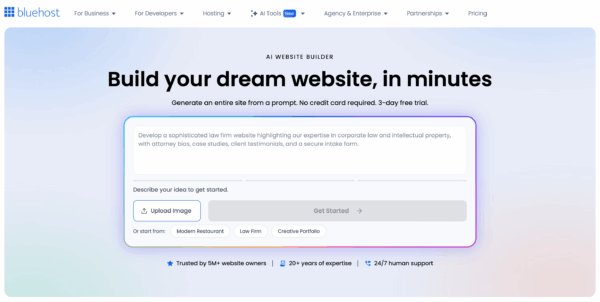
Bluehost’s AI Website Builder creates a website based on your description. Just answer a few questions, and the AI generates your site. You can adjust everything through conversation, with changes happening in real time.
Most AI builders give you a template and leave you to it, but Bluehost’s AI stays with you. It builds your site live, lets you make changes through chat, and keeps helping after launch. You see changes in real time, no coding or design skills needed. Just describe what you want. Hosting and a domain are included, and human support is available if the AI can’t help.
Of course, you can customize the design, but it won’t be as unique as a custom-built site. It’s also not ideal for complex features like membership portals.
How to get started
- Describe your site: Start with a prompt like “I need a website for my bakery with online ordering.” The AI will ask about colors, layout, and features.
- Watch it build: See pages, text, and images appear as you chat. If something’s off, ask for changes like “Make the header bigger” or “Add a contact form.”
- Publish and update: Pick a domain, choose a plan, and publish. Keep chatting with the AI to update content or tweak the design later.
What it costs
Plans start at $9.99/month for the first year, then renew at a higher rate. The e-commerce plan, with online store features, starts at $19.99/month.
Who it’s for
Not for big companies or agencies, but ideal for:
- Small business owners who need a professional site fast.
- Freelancers who want a portfolio without technical hassle.
- Bloggers who don’t want to deal with setup.
- Anyone who’s struggled with website builders before.
Final thoughts
Bluehost’s AI builder gets a site online quickly. It’s not perfect, as customization is limited, but it’s practical if you need something fast and easy. If other builders frustrated you, this might work better.
Watch out for these hidden costs
One common misconception is that the costs end when your site goes live. That’s not true, because some of the most expensive problems show up after launch. These can include:
Non-converting content: You can have the most beautiful website in the world, but if it’s not pulling in paying customers, there’s a problem. Consider investing in professional copywriting and SEO-friendly content to ensure visitors take action.
Dropped traffic: SEO issues can really hamper your traffic. Without help, it’s easy to make errors that could take months to fix. This is very much a case of prevention is better than cure.
Technical debt: Sites built on outdated technology or poorly coded templates may work at first, but become costly to maintain or upgrade over time.
Accessibility cost: It’s important to ensure your site caters to everyone, especially those with visual or auditory impairments.
Legal costs: There are certain legal requirements to meet. These aren’t just there to protect the customer; they protect you, too. So, don’t forget you’ll need a cookie consent tool and a terms of service policy.
Budgeting tips for small business owners
By spending smart, you can get big results for less. Here are a few things to keep in mind:
- Start with clarity, not complexity
Fancy animations might look nice, but if they confuse your visitors, they’re not worth the price.
- Spend more on content than code
Great content = better SEO = better ROI.
- Invest in tools that scale with you
WordPress and Yoast SEO both grow with your business.
- Plan for the long game
Don’t treat launch as the finish line. Content updates and SEO tweaks are ongoing
Ecommerce vs. general website: Does it change the cost?
Yes, dramatically. Ecommerce sites need payment gateways, product listings, inventory management, legal disclaimers, and stronger performance and security. Expect to pay more, sometimes a lot more, for development, plugins, and maintenance. But again, tools like Yoast SEO help make your product pages more visible and your content more persuasive.
Platforms like WooCommerce and Shopify offer a practical, flexible way to run your online store without reinventing the wheel. But the real key to success is visibility, after all, if people can’t find you, they can’t buy from you. And this is what Yoast SEO for WooCommerce or Yoast SEO for Shopify does best.
Here’s a clear comparison table for e-commerce vs. regular website costs in USD, with realistic low-to-high estimates:
E-commerce vs. regular website costs
| Type of cost | Regular website (Low) | Regular website (High) | E-commerce site (Low) | E-commerce site (High) |
|---|---|---|---|---|
| Domain name | $12/year | $60/year | $12/year | $60/year |
| Hosting | $5–$12/month | $30–$100/month | $25–$50/month | $150–$500+/month |
| Design & UX | $0 (DIY template) | $12,000+ | $1,500 (basic theme) | $20,000+ |
| Development | $0 (DIY) | $45,000+ | $3,000 (basic setup) | $60,000+ |
| Initial content | $200 | $6,000+ | $1,000 (product listings) | $10,000+ |
| Payment processing fees | N/A | N/A | 2.9% + $0.30/transaction | 3.5% + $0.50/transaction |
| E-commerce platform fees | N/A | N/A | $29/month (Shopify Basic) | $299+/month (Shopify Plus) |
| Security & compliance | $120/month | $600+/month | $300/month | $1,500+/month |
| Maintenance | $50/month | $500/month | $200/month | $1,000+/month |
| Marketing & ads | $110/month | $11,000+/month | $500/month | $20,000+/month |
| SEO & content updates | $250/year | $6,000+/year | $1,000/year | $12,000+/year |
Final thoughts
Ultimately, what matters about your site most is what it does for your business. With WordPress and Yoast SEO, you can create a professional site that looks great, enhances your online visibility, and grows with your business, without breaking the bank. One of the best things you can do to really set the wheels in motion now, though, is to take this WordPress for beginners training course and learn how to put yourself and your company first.
Good SEO is a smart investment, so start today. Good luck!
